Man Overboard
It works with your mobile Tethering wi-fi, that creates a network with all mobile/tablet guests on a boat.
It must be installed just in one device, that it keeps on the boat.To setup Man Overboard App on your mobile/tablet follow these steps:
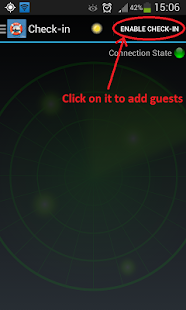
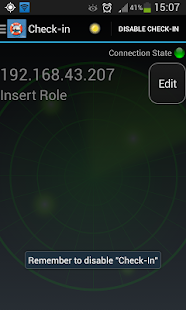
- Configure the mobile tethering wi-fi with a password;- Turn on the GPS location system on your mobile/tablet;- Turn on Man Overboard App;- Enable check-in on Man Overboard;- Share the tethering wi-fi password with your guests on the boat and ask them to join your network with their mobile/tablet;- A list with the device ips will be visible on the screen;- When the number of devices on Man Overboard it is the same of the number of your guests, disable the check-in mode;- You can eventually rename the device ips with the person real name and the role.
The remote device ip is visible on the mobile/tablet guest on the wi-fi connection configuration, clicking on the network previously created.
The combination device-person name will be permanent stored in the App untill you rename it, reset or uninstall the App.
After these steps the Man Overboard is correctly configured, now it checks every 10 seconds if all devices are still linked to the network.
If one or more devices will be not available, Man Overboard App plays an alarm and highlights which device/s is/are missing.
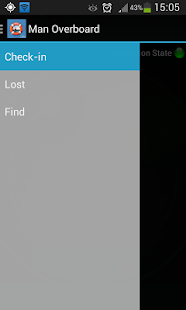
On the lost tab you can find the missing people and clicking on Find, Man Overboard App opens the navigator tab where it gives you the directions to find the missing person.
You have just to lead the boat in the way that the bow direction arrow point to the same direction of the dead reckoning arrow.
You can see the distance from the disconnection point.
Pay attention if you turn off the App you may need to redo the check-in routine.
We suggest to disable and reneable the tethering wi-fi when you change guests on the boat.
About Man Overboard
- Package name (App ID)
- hte.mob
- Available on
- Google Play
- Price
- Free
- Version
- v1.2.2
Looking for the Man Overboard APK?
The safest way to get Man Overboard (hte.mob) on your Android device is to install it directly from Google Play — you'll always get the latest official version, automatic updates, and no risk of modified or infected APK files from third-party sites.
Social Features
Connect and share with friends and the community.
Gaming Features
Enjoy immersive gaming experience with various game modes.
Fitness Tracking
Track your workouts and monitor your health metrics.
See Man Overboard in Action
Frequently Asked Questions
Is Man Overboard free?
Yes, Man Overboard is free to download and install on Android through Google Play.
How do I install Man Overboard on Android?
Open Google Play on your Android phone or tablet, search for Man Overboard or tap the Google Play button on this page, then tap Install. The app downloads and installs automatically.
What is hte.mob?
hte.mob is the App ID (package name) of Man Overboard on Google Play. Every Android app has a unique package name, and it is the safest way to verify you are installing the official app.
Is Man Overboard safe to download?
Installing Man Overboard from Google Play is the safest option: you get the official version, verified by Google Play Protect, with automatic updates. Avoid APK files from unofficial third-party sites.
Get Man Overboard Today
Man Overboard for Android — free download on Google Play.
Compatible with Android phones and tablets — available on Google Play.
Ask AI about this app
Get instant answers about features, tips and more from popular AI assistants.